Showing posts with label work systems. Show all posts

Sunday, April 5, 2015

Using Work Systems to Create Educational iPad Success

As I wrote a guest post for Educational Experiences, I began to realize that we live in a world where iPads and other technology devices play a significant role in our family and educational lifes.  Let me be honest, on multiple occasions, I have put an iPad in front of my boys so I could get a few things done or we could have a successful car ride without the fights and 'are we there yets'. 

This is something I struggle with everyday: When is too much, what iPad apps are appropriate, and how do I create a healthy balance.  Especially with my technology loving seven year old, who would prefer to play an iPad the majority of the day.  A little less of a problem if he would engage in playing first grade educational apps, but unfortunately for EJ and myself, that is not the case.  He would rather spend hours playing Minecraft and watching Netflix and YouTube!  I am sure you can imagine the power struggles. 

So I asked myself, how can I alleviate the power struggle, in an appropriate way?  What better way then to use the principles of structured teaching!

I started by creating a folder for Math, Reading, Spelling, and Games.  (Don't know how to make folders on your iPad?  CLICK HERE)
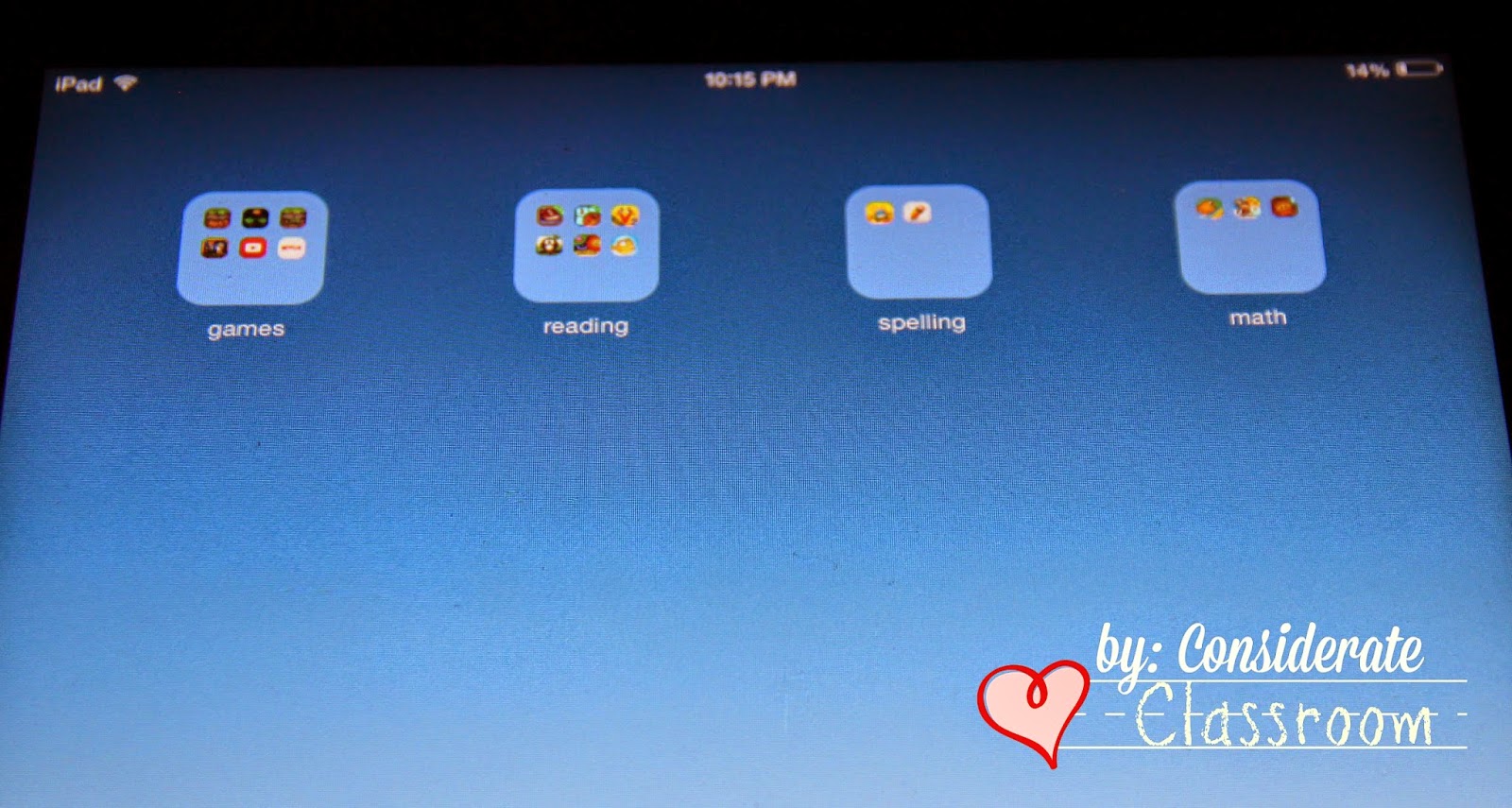

Then I created labels in a word document for Math, Reading, Spelling and Games.  I cut them out, used packing tape to laminate them, and add rough Velcro.  Next I added soft Velcro to the inside cover of our iPad case and a self-adhesive library pocket to make an iPad work system.  


Notice in the beginning, I designed his work system as games, spelling, games, reading, math, games.  I did this to help support his success and compliance.  He use to have free rein on the iPad.  If I would have went straight to doing math, reading, spelling and then games, as I would prefer, I would have lost him!  So instead I started out small.  I even made game times double the amount of academic times.  To enforce the times, I set the timer under the clock app on the iPad.  I even put the timer on the same page as the folders.


Don't have a reader?  Label your folders by number. . . 


Or by letters. . .


Is your student/child unable to read letters or numbers?  Download this jpg to create a colored wallpaper for a colored work system. 


If you would like to create a word, letter, number, or color work systems, feel free to print this document.  I have included a large and small version, so if you have an iPad without a cover you can still use the system by attaching a strip of Velcro to the edge of your case. 


The bottom line is that if used in a systematic way, iPads and other technology devices can be influential in the lives of children at home and school.  For more tips and strategies for using iPads and other devices, visit my presentation on slideshare 25 Ways to Use an iPad in an Early Elementary Classroom.   

Wishing you an 'App'y Day!  
Lindy


Wednesday, July 2, 2014

Workbasket Wednesday Link Up


This is my first time to join a linky party, but there is no better way to start than to do one with work baskets as the topic and one of my very favorite blogs, Autism Classroom News as the host! 

Work tubes, work baskets, or work boxes, whatever you want to call them.  The kids love them and learn a lot from them. 

Students and parents in our program are very familiar with them as they are one of the first activities we do with our students to encourage attention to task and support learning to learn skills.  It is amazing how quickly our little ones pick up on the structure of a work basket.  If the structure is there they will succeed!  Especially when it is a work basket of interest. 

Below are three of my favorites that I created specific for a little guy that is really interested in all kinds of sports balls.  Originally, he throw everything he could get his hands on, due to his extreme interest in balls, but as we got him interested in these and a few other ball activities I will share in a future post all the inappropriate throwing went away as he learned when throwing, kicking, bouncing and catching were appropriate and got his fix of doing all four. 

WORK BASKET 1: Soccer Ball Put In


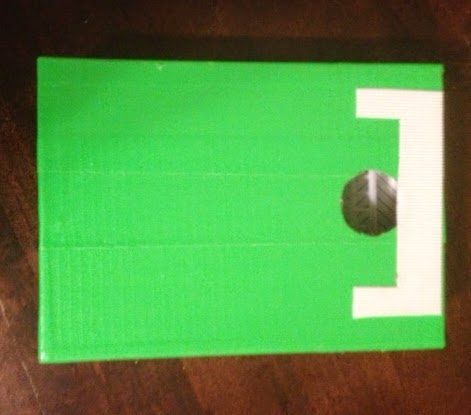
This task is quite simple the student either puts in or flicks soccer erasers into the goal. I got the erasers from the dollar bins at Target and the soccer goal from the cake decorating section at a party store.  To save time I simply covered the box lid with Green Duct Tape and then Velcroed a plastic score goal on top.  Hint: I Velcroed the soccer goal on rather than gluing it so I can take it off to save room when storing it.


WORK BASKET 2: Where does it belong?


This task used the other three sports erasers in the set from Target.  I simply made a template with three different columns.  In one I put a baseball diamond, another a basketball court and then the other a football field.  The student sorted the balls by putting them in the correct hole.  TIP- One of my favorite boxes for tasks like this are kid’s Nike shoe boxes.  They are sturdy, and little for storing. 

WORKBASKET 3:  Who does it belong to?


This task simply involved making a second template with the people who play the various sports.  I removed the sport locations and googled images of a basketball, football, and baseball player to add to the second template.  I choose to make my sports players 2D as they stand upright with a Velcro tab at the bottom.   

And there you have it a two in one task.  I simply Velcro the second template over the box when we are ready to give the who does it belong to skill a try.

If anyone out there would like to give the Where does it belong and Who does it belong to sports editions a try in their classrooms, feel free to email me at considerateclassroom@gmail.com and I will send you my template. 

Happy Workbasket Wednesday Everyone!  Whew---I just barely made it in by Wednesday:)