Showing posts with label iPad Activity. Show all posts

Tuesday, June 25, 2013

Educational iPad App & Website Recommendations for Children

It has taken me a lot longer than anticipated to get this post up.  Last week, I was out of town for the amazing Summer Institute training hosted by TASN’s Autism and Tertiary Behavior Supports Team. 

But as a result of my parenting sabbatical, my two year-old son has been attached at the hip to me this week!! Fittingly, my husband currently refers to our son as "Mommy's Velcro".  I haven’t been anywhere without him nearby. But I must admit I don’t mind, he'll grow up soon enough!  (Actually, he's is sitting on my lap "helping" me type this post!)

Recently, I gave an iPad presentation at the Pilot Conference in Manhattan, KS.  This week I want to share the iPad apps that the participants of the conference recommended after my presentation.  

(Please note this list is based on my interpretation of the written feedback I received.  Exact titles and authors have yet to be confirmed.) 

iPad App Recommendations for Children

ABA Belonging by Kindergarten.com
Autism App Tracker by Track and Share Apps, LLC
Bugs and Bubbles by Lit Bit Studio
Candy Cruch Saga by King.com Limited
Dr. Panda Series by Tribe Play
Dora ABCs, Dora Rhyming, and Dora Reading by Nickelodeon
Endless Alphabet by Callaway Digital Arts Inc
Flow Free by Big Duck Games
Fluid Monkey by Buzz Monkey Software
Fluidity by a4cwsn
Grid Player by Sensory Software International
Helpkidzlearn apps
Jigsaw 1-2-3 by Giggly Up Kids Apps and Educational Games
Learning to Write with Smart Balloons by App Developer
Make 10 Plus by Bess Siegal
Math Ninja by Razeware LLC
Monkey Preschool Lunchbox by THUP Games
Montessori Number Puzzles and Montessori Place Value by Montessori Tech
Mr. Potato Head Create and Play by Callaway Digital Arts Inc
My Piggy Bank by Kristin Whitehead
My Play Home by Shimon Young
Preschool EduKids Room by Cubic Frog Apps
Real Animals HD by PROBE
Screen Time by Baby Binks
Smarty Pants School by Smarty Pants School LLC
Spell Better by Navanit Arakeri
Splash Math by Study Pad, Inc
Storia by Scholastic Books
Swapsies Occupation by Spinlight Studio
Tap A Tune by Mind Shapes Limited
The Electric Company by PBS Kids
The Social Express by the Language Express, Inc
Toca Boca Apps
Toddler’s Farm Animal Puzzles by Endless Mode

Participants also shared with me a few favorite computer websites for kids.  As a parents, I am very excited about these because my 5 year-old son, EJ, is really into playing on the computer right now. Like many of you, I prefer that he plays more educationally based games. 

Website Recommendations with Educational Games for Children


For those of you who are reading this post but did not attend the Pilot Conference, you can view my list of favorite apps via my iPad App Technology Matrix.  It was a matrix that was created last April.  However, as you can imagine my staff and I have found many more excellent apps since then. Here's that list: "25 Ways to Use an iPad in a Preschool or Elementary Classroom - (Plus, the App Recommendations to Get Started Today!)"

If you have an app or website suggestion to share, please add it to the comments section of this blog.  I am always looking for new technology suggestions!! 


Until next time...Happy iPad, iPhone, and Computer Playing!!  (Now, I have a two year-old to pry off of me!)


Tuesday, March 5, 2013

Training Little iPad Users


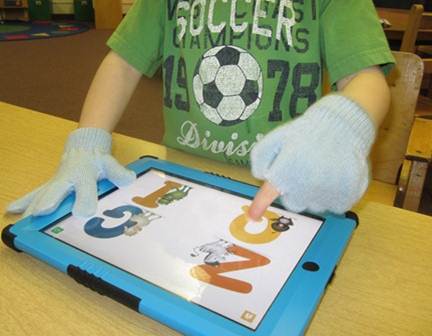
When I first started using an iPad in the classroom two years ago, my husband came up with this amazing way to teach children how to use their index finger to point and touch.  Several of my students were getting frustrated as they did not have the concept of pointing and would try to operate it with their whole hand or both hands making it difficult and very frustrating for them. 

As my husband suggested,  I bought kid-sized cloth gloves and snipped only the index finger out.  The students wear the glove to hold and brace the iPad.  Since the iPad does not register the touch of the fingers covered in the glove,  the student also learn that only one finger is needed to use the iPad.


It works like a charm!!  Some students wear the modified glove on one hand and a complete glove on the other to work on using their dominate hand.  


Later, I modified another glove by sewing the pinky, ring finger, middle finger, and thumb slots together to support students in pointing with their index fingers. Thanks for the idea, Miss Dixie!!


Tuesday, February 26, 2013

iPad Divider: Creating Individual Work Spaces

Last year, I started a system where students would work at direct instruction in small groups of two or three students.   I had each student work one-on-one with me while their peers reviewed concepts and skills on the iPad. 

This system was extremely helpful because it gave me an opportunity to work individually with a student on specific academic skills like writing his/her name and labeling colors, shapes, numbers and letters.

However, there was a small problem with this system.  Because the iPad is highly motivating and interesting to children, students working with me would be easily distracted by the students working on the iPad.  I couldn't move the students who were working on the iPad because they often need support in using it, especially in transitioning from one app to another.

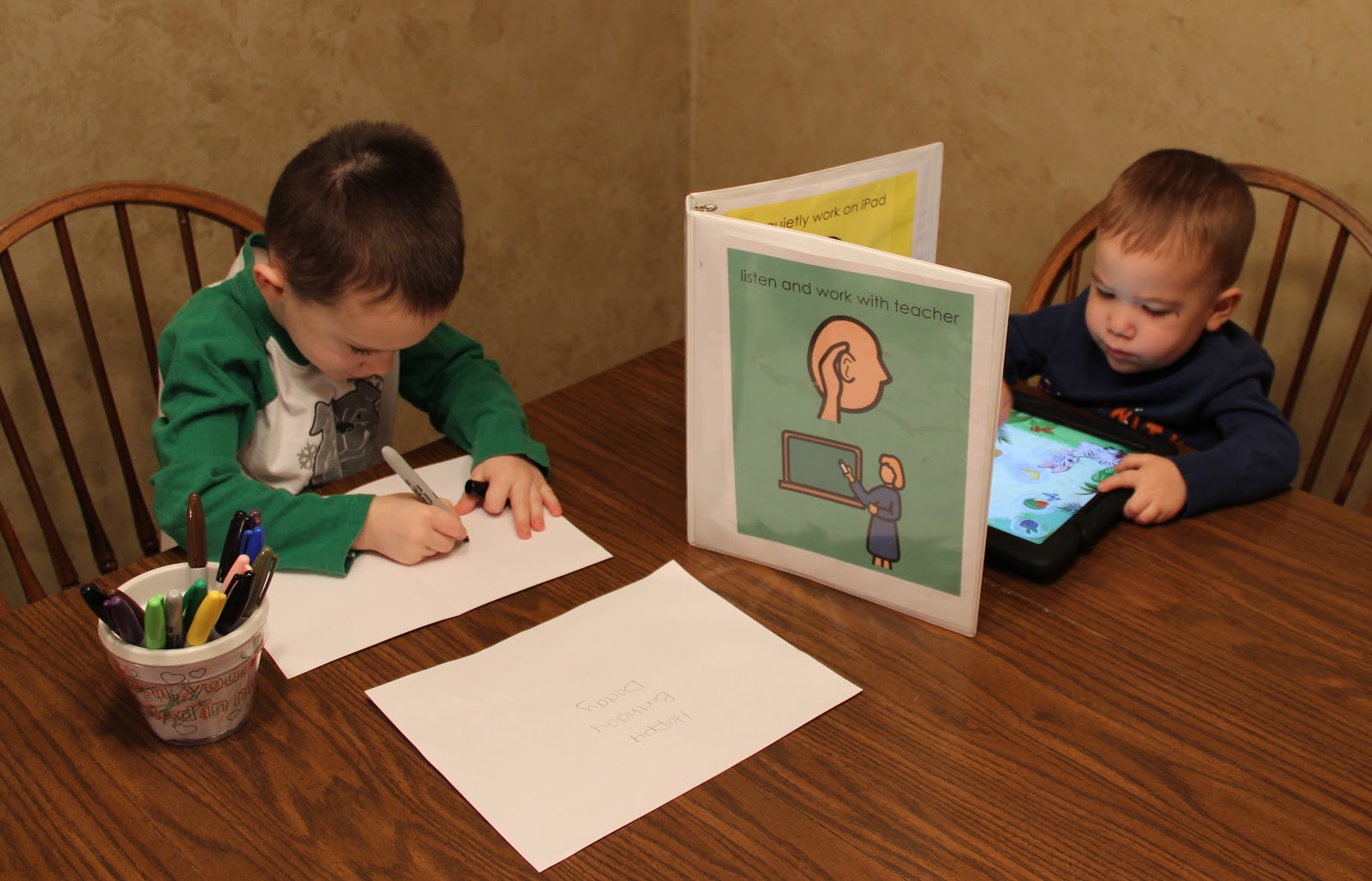
Rework:   I developed visuals to help students focus on both their individual teacher instruction and iPad work times.  The visuals are placed on the inside & outside of a binder.  The binder is then propped up to divide the work space for the children.  


Quiet Prompts are taped to the inside cover of the binder & 
reminds the student to "Quietly Work on iPad".
Listen & Work prompts are slid into the binder's clear cover &
reminds the student to focus on individualized teacher instruction.  

Here is a picture of my boys using the visual. Payton worked 
on the iPad, while EJ & I made a birthday card for daddy.


Tuesday, January 8, 2013

Task Box Countdown: Task Box #2 - The Bubble Gum Machine Fun

My Top 10 Task Box Countdown began last week with "TaskBox #1: Academic Sensory Bags".  This week we move onto an excellent multi-purpose task box, The Bubble Gum Machine.

My students often get tired of the same old task boxes. Even though they may not have mastered the skills being practiced in the task, it gets old working on the same task over and over.  Other times students master a skill when presented in a specific context, but have difficulty using the skill in a different capacity. Needless to say, I am always looking for new ways to work on the same concepts.  
Teacher’s Tip:  When creating task boxes for the classroom, think of ways to make your materials fit more than one skill. You’ll get more bang for your buck!!!  

For example, this week I found these small bubble gum machines for a dollar at Dollartree.  Simply add some fuzzy pom-poms and you have a motivating and unique assortment of tasks.


Activity #1 - Basic Counting Task:  Add number flash cards and you have a counting game.  Instructor's Insight: Add sticker dots to your flash cards and you have a way to work on one-to-one correspondence.  Or if you put the sticker dots on the back, they can be used for the more complex skill of self-checking. 


Activity #2 - Advanced Counting Task:  Put several different colors of pom-poms in one machine and have your students count how many of each color.  For a higher-level challenge, use this template to increase the task’s complexity. 


Activity #3 - Fine Motor Skills Task:  Add an ice cube tray & tongs and you have a unique fine motor skill building activity.


Activity #4 - Non Verbal Task:  If you have nonverbal students or students who do not know their colors yet, you can use this aided language page.  The students can match or point to the colors as they draw them from their bubble gum machine. 

If you are playing the game with a student who is at a higher-level and already knows how to sort and name colors, ask him/her to graph the colors he/she and their friends draw from the bubble gum machine using this graph template.   


Language-Aid Page

Activity #5 - Taking Turns:  Lastly,  add a "Take 1" fabric bag or container for a turn-taking practice game.  

A "Take 1" bag or container is just a little fabric bag or container with the phrase “Take 1” written on it.  I make them to use in our classroom to practice selecting only one item.  Often times when students are asked to take one item from a bowl or bag of items, they grab a   handful.  By using the take one bag we can work on the skill of taking one, and all support staff will remember to prompt with the term "take one" as it is printed on the bag.  Instructor's Insight:  If a student is having trouble with the concept of taking one, I will only put one item in the bag or container to make their selection errorless. 

To use the "Take 1" bag in The Bubble Gum Machine Game, you would simply have the students take turns taking one pom pom out of the bag, name the color they pulled, and then  put it into the correspondingly-colored gum ball machine.  Or add several different colored pom-poms into the bag.  Have the student draw only one pom, identify its color, and place it in the bubble gum machine.


There you have it .... five activities for the price of one!  And to think, I almost passed up purchasing these bubble gum machines because I thought it was too much storage for one simple sorting activity.  

Extra credit:  A great app that goes along with the same idea of sorting gum balls is 
Candy Count - Learn Colors & Numbers. 


Tuesday, October 16, 2012

Greet and Treat Halloween Party

Our classroom is currently preparing for our Annual Greet and Treat Halloween Party.  Every year we celebrate holidays with functional parties that practice social skills that relate to the traditions for the holiday.  This helps students practice the social skills they need to be successful at family and community events. 

For Halloween, the skill we practice is trick-or-treating (without costumes).  Before the big day, I find teachers and staff who are willing to let us visit their classrooms/offices during out  greet and treat activity.  I often choose rooms and people who are familiar to the students  (the nurse’s station, the speech language room, the office, etc.)  Parents donate small party favors or snacks beforehand that serve as the treat at each stop. The children decorate a treat bag during art the day before our Halloween party.  


Our Greet and Treat Bag:  It's a large grocery bag with a handle cut-out near the bag's opening. 
On the big day, I post numbered, printed light bulbs outside our designated stops.  The light bulb images representsignify the illuminated porch lights the children will look for while trick-or-treating in their neighborhoods later that evening. 


The above image signifies the second stop on our Greet and Treat quest.
Then during the designated time for our elementary building’s fall parties (usually the last hour of the day), we have the students "Greet and Treat".  Before we start I read a social story about what we will be doing during our "Greet & Treat". 

Teacher's Tip: Social Story™ describes a situation, skill, or concept in terms of relevant social cues, perspectives, and common responses in a specifically defined style and format.)You can learn more about social stories by visiting Carol Gray’s work at this link  www.thegraycenter.org/social-stories.   

Our Greet and Treat Social Story 
Today, we will be Greeting and Treating. It is just like trick-or-treating.  We will walk quietly in the hall in search of five classrooms with light bulbs outside of them.  
When we find one, we will knock on the door and say "hello”.  The person who answers the door will say “hello” back and give us a treat. We can only take one treat and we may not go into the classroom. We are only stopping by for a visit. Then we will say "thank you" and "goodbye".  
Next we will search for more light bulbs.  When we have all five light bulbs, we will quietly walk back to our classroom and put our bag of treats in our backpack so we can show our families after school.  
Greeting & Treating is lots of fun when we follow the rules.  We stay close to our teachers.  We walk quietly in the hallway and we use our best manners to greet teachers and say "thank you" and "goodbye".  

The story is written on Boardmaker using visual cues.  If you would like a copy of it, just shoot me an email at considerateclassroom@gmail.com.

Next, the children line up to go on our "Greet and Treat".  We walk down the hallway in a line in search of rooms with numbered light bulbs affixed to their doors. When we get to one, the children knock on the door and say "hello" and then receive a treat.  Many of our children have IEP goals that work on appropriate social greetings so this activity is perfect.  

For those students that need extra support, we provide mini language aided boards to facilitate their language.  For nonverbal students, we bring a step-by-step communicator for the students to say "hello", "thank you and "good-bye".  (Refer to this link for more info http://www.mayer-johnson.com/step-by-step-with-levels .) 


Mini Language Aid Boards used to support non-verbal students.
Instead of the step-by-step communicator, this year I am going to try using our iPad so the student has to choose what they will say rather than just hitting a button.   I plan to use the Answers: Yes No App by Simplified Touch. Using this app I can program two buttons for the kids to choose from to communicate with.  I am going to use "hello" and "thank you".  We also work on waving and signing thank you as appropriate. Instructor's Insight:  Sometimes by having the staff wave or sign thank you, the children have a cue to do the same and often add language to it.  

Often our first stop is Miss Andy, our Speech Clinician.  She then joins our quest and serves as additional support. The activity also provides great data on greeting goals.  It is amazing to see how many of the children greet appropriately for a treat.  It is a highly motivating activity that serves a dual purpose of getting the children ready for the evening’s events.  

Some of our students have never been trick-or-treating because parents are a little nervous to do so, but after they see their child’s success at our Halloween party they are more likely to give it a try. (All parents and caregivers are invited to join us for our Halloween party.) I also provide my address to families if they would like to trick-or-treat at the house of a familiar face later that evening.
 
** A special thank you to my little sister, Julie, for helping me brainstorm this idea five years ago when I started teaching Special Education Preschool.